
At a glance
- Built for
- A team running several Telegram projects. Previously on third-party software.
- My role
- Design and the whole build: architecture, Telegram engine and scheduler, web interface, AI warm-up, automated tests, Windows build.
- Task
- Replace third-party software with the client's own tool: unattended 24/7, safe for the accounts, no wasted views, everything in numbers.
- What I built
- A Windows program (one
.exe) with a web interface: stats, sources, bulk profile setup, auto-replies, AI warm-up, appeals. - Timeline
- First production version on October 5, 2026; version 2.6 by October 27.
- Output
- In 30 days: 1,174,914 stories, 391,555 reactions, 360,313 unique people, 5,731 chats and channels. Now ~45,000 stories a day from 38 accounts in 3 tasks. Activity counts only: profile visits, messages and applications aren't tracked by the program.
- Cost to run
- $1.61 of AI for all warm-up so far. The accounts, their Telegram Premium, proxies and the always-on PC aren't tracked.
- Status
- In daily use since October 5, around the clock. The main stream has run 21 days without a stop, and all 28 of its accounts still work (as of November 4, 2026).
The idea
Telegram has Stories, just like Instagram. When someone views or reacts to your story, you see who it was, and it's hard not to tap through to their profile.
That's mass looking — bulk story viewing: an account views thousands of people's stories, some visit its profile, and the profile is a business card, with the offer in the name, a link in the bio and an instant auto-reply to messages.
By hand, it doesn't scale. In this project's data, only about 1.5% of chat members checked had stories at all, and each must be opened, some reacted to, with no repeats, tens of thousands of times a day. Telegram also restricts accounts that look automated, so keeping accounts alive shaped much of the design.
The client had outgrown third-party software. Their own tool had six requirements:
- 24/7, unattended: closing the interface stops nothing, and after a power cut or reboot the tasks resume where they stopped.
- Protect the accounts (each a paid Premium account): behave like a person on a phone and stop by itself if something goes wrong.
- Waste nothing: no viewing the same person again too soon, no dead chats, no missed Premium expiry.
- Everything in numbers: stories, reactions, people, what each account is doing right now and which chats bring the biggest audience.
- One window for tasks, accounts, proxies, bios and auto-replies, with no console and no hand-edited files.
- Keep what worked: chat-walking and viewing as in the old software, everything around it better.
What the client sees
Tasks and live stats
A task is a folder of accounts plus settings, all working in parallel. The start screen (top of this page) lists tasks with totals, speed and a 24-hour chart; inside a task, live counters show stories, reactions, unique people, speed per hour, chats and channels passed, completed passes and errors.

Every account, right now
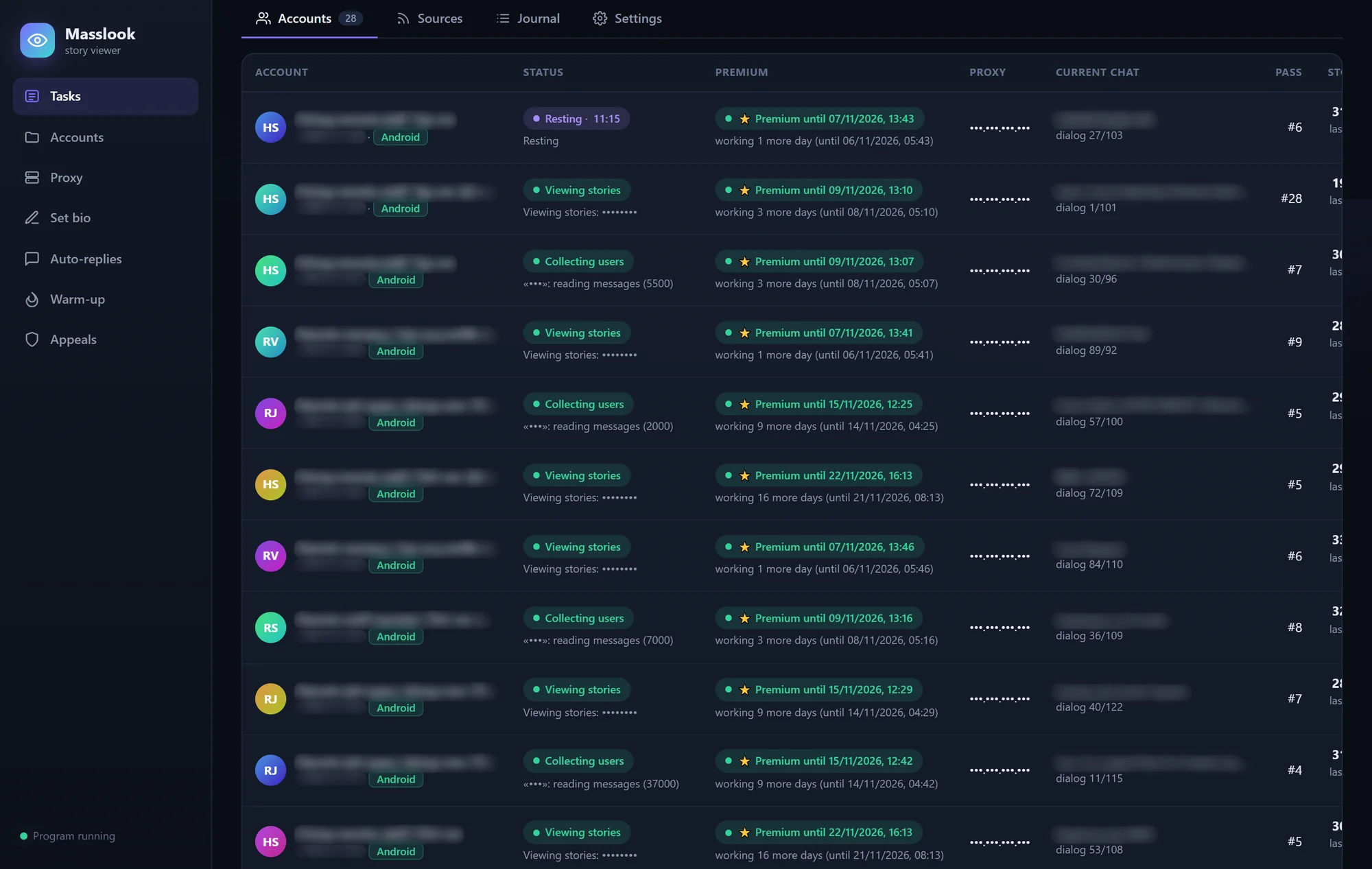
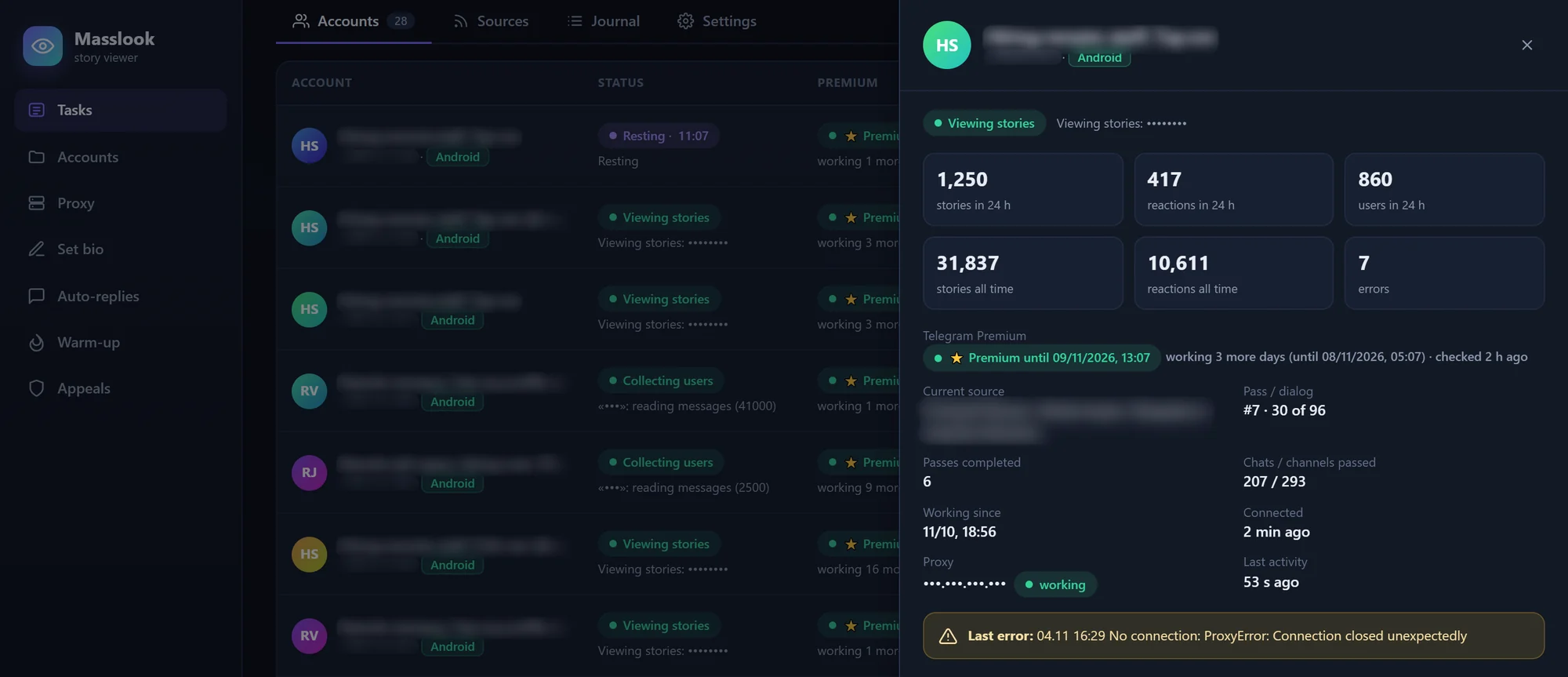
The accounts tab shows what each account is doing this minute: collecting users, viewing stories or resting with a countdown, plus its Premium expiry, proxy, current chat and place in the pass. A click opens its card: Premium status, connection, last error and stats for 24 hours and all time.
Which chats are worth walking
The sources tab ranks chats and channels by members, people checked, the share with stories, and the stories and reactions each produced. Useless ones are flagged with a reason: no discussion chat, only admins post, or no access.
It also lands in a database shared by all tasks, which opens like a regular table and exports to Excel; the client uses it to pick the best chats and join new accounts to them.

A journal of everything
Every event hits the journal in real time: messages read, people collected, stories viewed, people skipped and why. Filters show only views, problems or rest periods, for all accounts or one.

Profiles that work as business cards
An account only works if its profile does, so profile setup is built in:
- Bulk bios for a folder or selected accounts, one account at a time rather than all at once. A check shows who lacks a bio.
- Telegram Business auto-replies, which Telegram itself sends to anyone who writes, even with the program off. Masslook sets, checks and deletes them, and keeps exactly one per account.
Warm-up with AI
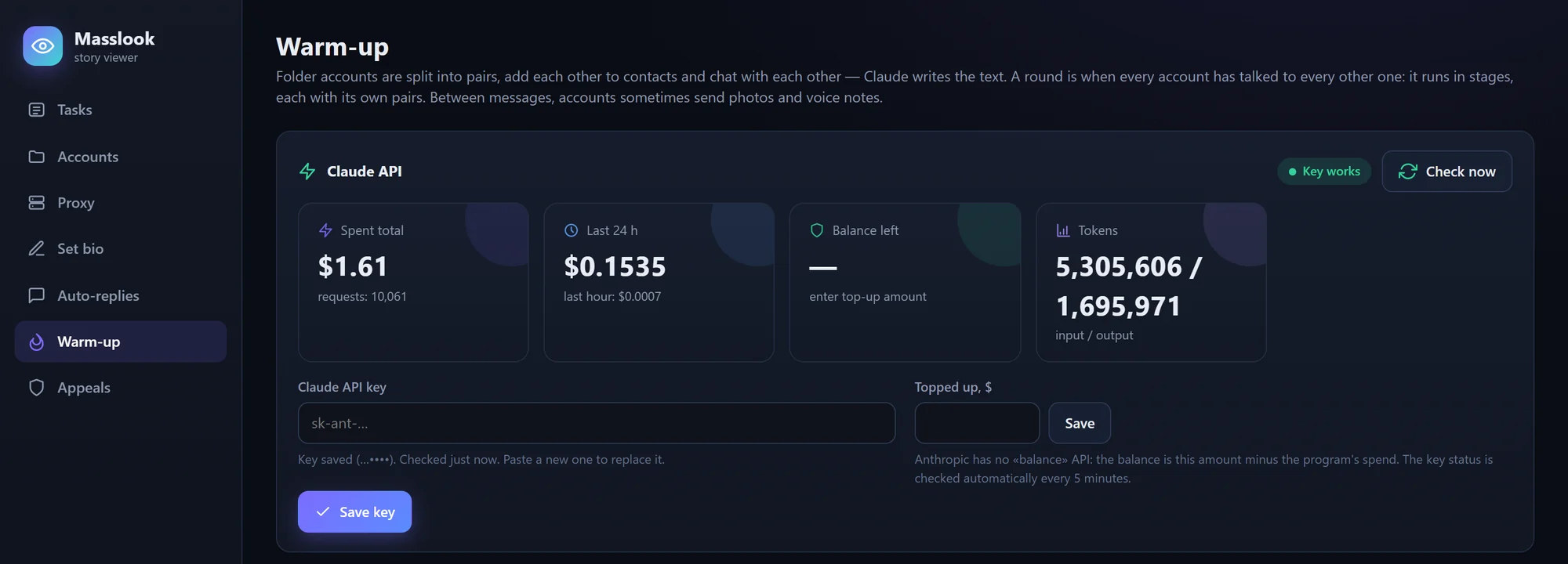
A brand-new account with no chats, contacts or history looks like a bot to Telegram. So in the warm-up module, the client's own accounts pair up, add each other as contacts and chat about everyday stuff, with Claude writing the words. Spending is tracked in total, per day and per hour; a limit stops it automatically.
Checks and appeals
A sign-in check runs through a folder: each account connects, reads its Premium status and disconnects, changing nothing. For restricted accounts, the appeals module follows Telegram's official appeal procedure and saves the whole conversation to the database.
How it's used day to day
Each batch of accounts lives in its own folder, and new folders show up automatically. The client creates a task from one, checks the settings and hits start. The engine runs in a Windows console window kept open while tasks run; the interface is a separate window that can be closed and reopened without stopping it.
The routine happens in that window: hourly charts, the journal's "Problems" filter, the source ranking, new-account setup. When an account stops ahead of its Premium expiry, the client renews the subscription, and the account rejoins on the next start.
Right now: 3 tasks, 38 accounts, about 45,000 stories a day. Any setting can change on the fly, even for a running task.
Scale and cost

Let me be upfront: these are activity numbers. The program counts what it does; profile visits, link clicks and messages happen on the project's side and aren't tracked, so there are no conversion numbers here.
- Per account: about 1,200 stories and 400 reactions a day.
- If someone did this by hand: at 10 seconds per story, 45,000 stories a day is about 125 hours — roughly 16 full-time people. An estimate, not a measurement. And that's before the slow part, finding people with stories: about 2.7 million profile checks a day.
- Costs: $1.61 of AI for all warm-up so far, as counted by the program; story viewing uses no AI. No per-view charge either: views and reactions aren't bought from an ad platform.
- Not tracked: the accounts, Telegram Premium and proxies, which the client owns and pays for separately, and one Windows PC running around the clock.
How it works
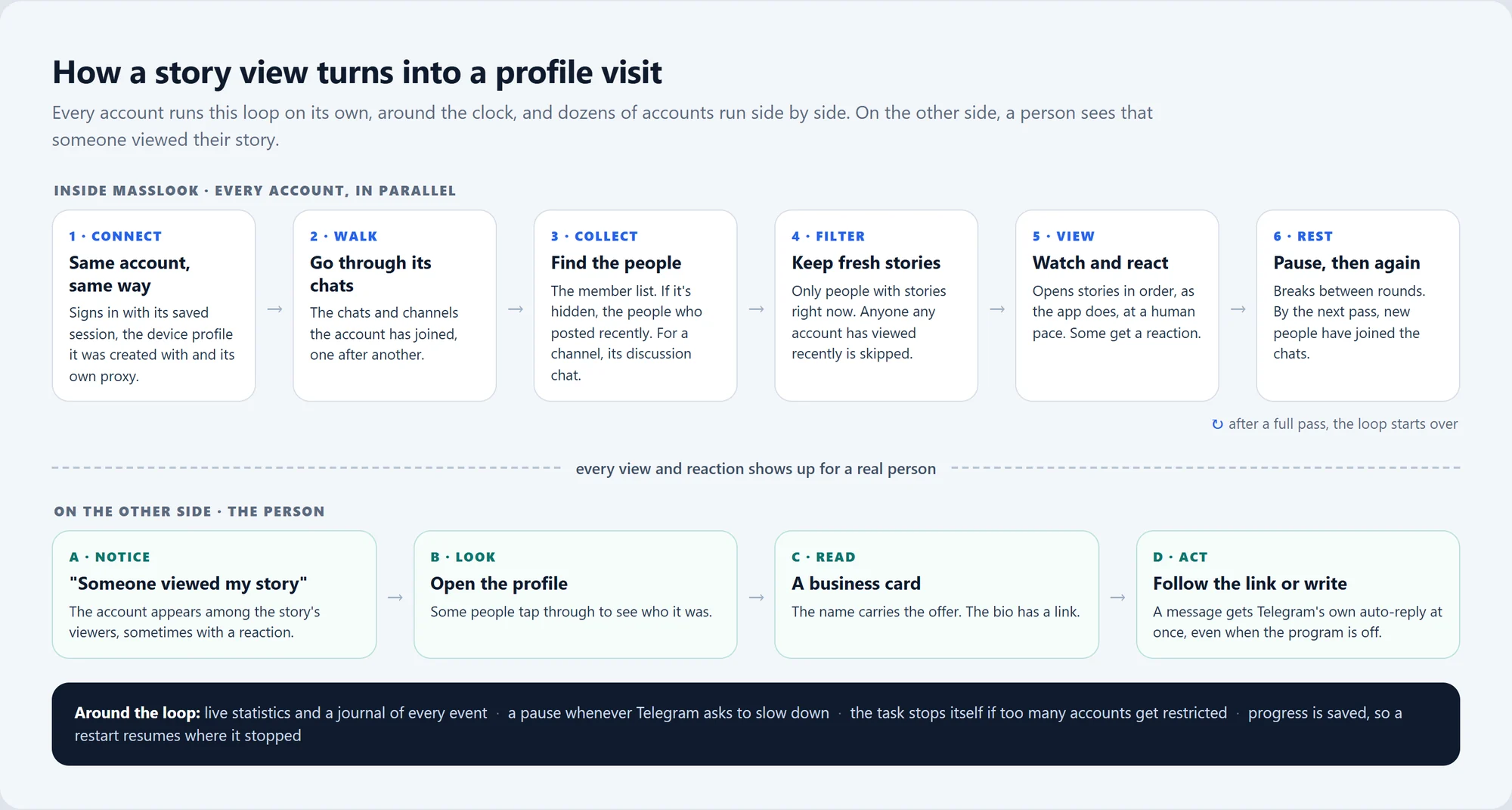
The loop is on the diagram: walk, collect, filter, view, rest and a new pass, by which time new people have joined the chats. Before changing anything, I checked the walking and viewing logic against the old software's work log, so the switch kept what worked.
One program juggles every account
An account mostly waits, for Telegram to answer or a pause to end. So every account lives inside one program, which switches to whichever one has work. Dozens of accounts run in parallel, with no separate copy of the program per account.
Each account's place in its pass, down to the chat, is saved in the database. After a reboot or a power cut, every task resumes from the same pass and chat instead of starting over.
Account safeguards and automatic stops
Each account is a paid Premium account, so losing one costs money. Protection works on three levels, all in code:
- Behave like a regular user. An account always connects the same way, one with an incomplete setup isn't started, and it waits whenever Telegram asks it to slow down.
- Never collide. An account can't be in two tasks at once: one session running from two places at the same time can make Telegram end it. If a proxy goes silent, the account moves to a working one.
- Stop before the damage spreads. If too many accounts in a task get banned or frozen, the task stops itself and shows a red banner listing the losses. Each account also stops 32 hours before its Premium expires, leaving time to renew.
Over 21 days without a stop, all 28 main-stream accounts kept working. That's an observation, not a guarantee: Telegram can still restrict accounts it sees as automated, which is why the auto-stop and the appeals module exist.
Warm-up for under a tenth of a cent per conversation
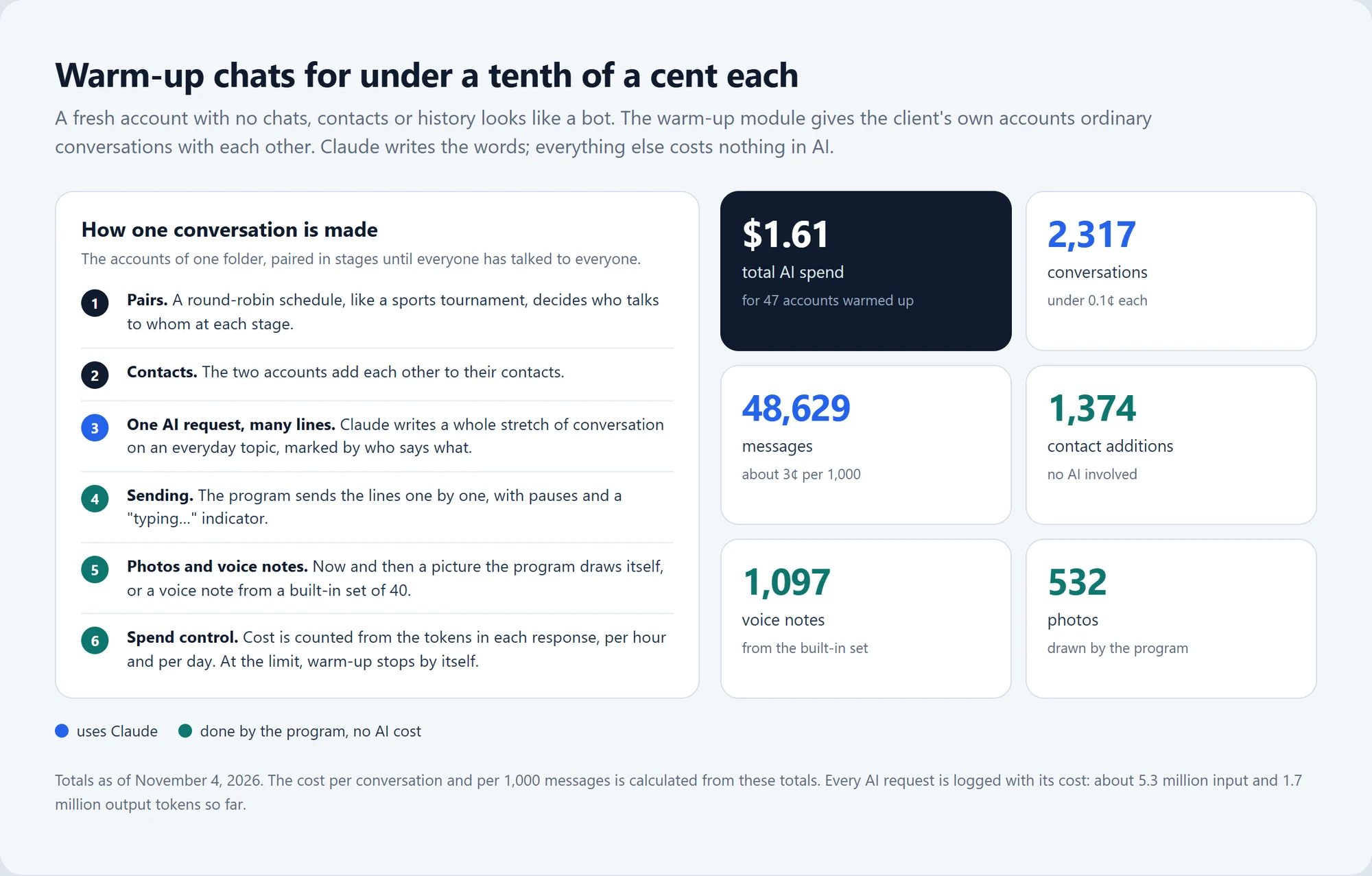
Warm-up doesn't make an AI request per message: one Claude request returns a whole stretch of conversation, marked by who says what, and the program sends the lines one by one. It draws the photos itself and takes voice notes from a built-in set, so neither costs anything in AI.
Anthropic has no balance API, so the program counts spending from each response's token usage and checks the key every five minutes with the cheapest possible request. The client enters the top-up, the page shows what's left, and a spending limit stops warm-up automatically.
The result so far: 2,317 conversations and 48,629 messages for $1.61, by the program's count.
Timeline
| Date | What happened |
|---|---|
| Oct 5, 2026 | The first production version goes to work, and the 30-day count starts. |
| Oct 14 | The main stream starts on 28 accounts and has run without a stop ever since. |
| By Oct 27 | Version 2.6 adds AI warm-up, bulk profile setup and Telegram Business auto-replies. |
| Oct 28 | The best day so far: 53,748 stories and 17,918 reactions🚀 |
| Nov 4 | 30 days in; the screenshots and video for this case are captured. |
Who this is for
- Teams running Telegram channels and communities with a pool of their own accounts, who want that work automated and measured.
- Projects on third-party mass-looking software that want their own tool, logic and stats, with no subscription.
- Agencies managing many Telegram accounts that need one window for profiles, auto-replies, sign-in checks and warm-up.
- Anyone who needs a long-running multi-account process on Windows that survives restarts, stops itself when something goes wrong and shows what it's doing.
Engineering details
Engineering details
The loop in detail
- Connect: the saved session, through a proxy.
- Collect: the member list or, if members are hidden, recent posters. For a channel, its discussion chat; a channel without one is skipped, with the reason saved in
sources.db. - Filter: people with fresh stories stay, and
masslook.dbdrops anyone any account has viewed recently. - View: stories in order, with a reaction on some.
- Rest: breaks between rounds and after each full pass, run by the asyncio scheduler.
- Record: every event goes to the journal; stats are kept per hour, account and source; each account's place in the pass is saved in SQLite.
Architecture
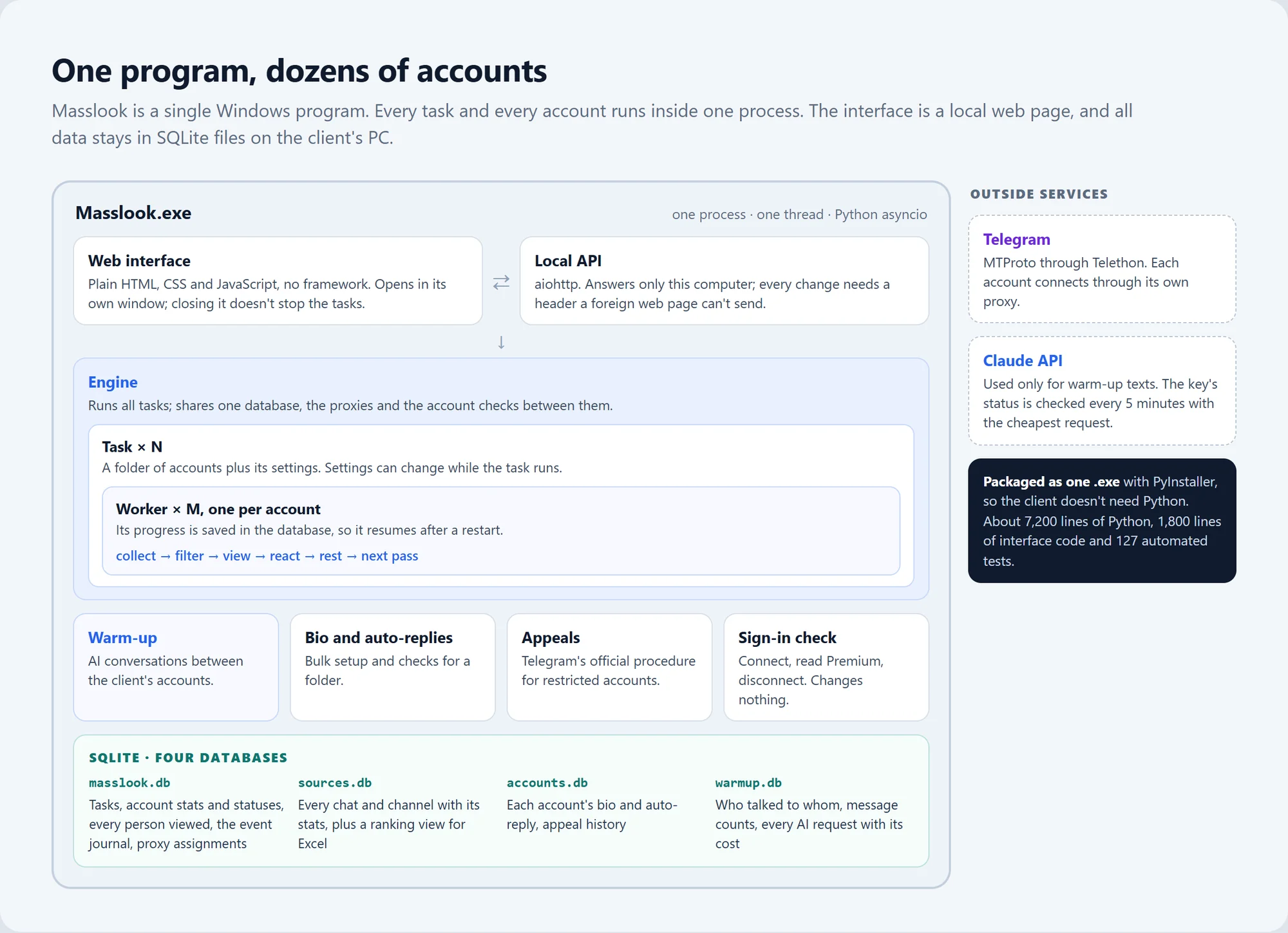
- Safeguards on the local API. A web page open in the same browser could try to send requests to the interface's local API. So the API accepts only requests addressed to
127.0.0.1orlocalhost(a guard against DNS rebinding), and every state-changing request must carry a custom header a foreign page can't send. - An interface that doesn't jump. Blocks redraw only when their markup actually changes. Tables and the journal keep their scroll position, and the journal sticks to the bottom only if it was already scrolled there.
Data and privacy
- Local storage: the databases and account folders, with each account's session and device profile, live on the client's PC, and the interface is served only to that machine.
- Outside connections: Telegram (through the proxies) and Anthropic's API for warm-up texts. Claude only writes conversations between the client's own accounts; the API key is stored by the program and shown masked.
- What the program sees: only what each account sees in the chats it has joined: member lists, recent messages and stories. What it keeps is in the table.
| Database | What it stores |
|---|---|
masslook.db |
Tasks, account stats and statuses, every person viewed (for de-duplication), the event journal, proxy assignments |
sources.db |
Every chat and channel with links and stats, plus a ranking view |
accounts.db |
Each account's bio and auto-replies, appeal history |
warmup.db |
Who talked to whom, message counts, every AI request with its cost |
Quality
127 automated tests, needing no network and no real accounts, cover the API, the account work loop, Premium checks, warm-up, the sources database and appeals. PyInstaller packs everything into one Windows .exe, so the client needs no Python. A session-diagnostics command shows how Telegram sees an account in its device list.
Tech stack
| Layer | Technology |
|---|---|
| Core | Python 3.12, asyncio: one process, one thread |
| Telegram | Telethon (MTProto) |
| Interface | A local aiohttp API; plain HTML, CSS and JavaScript, no framework |
| Data | SQLite, four databases |
| AI | Claude API for warm-up conversations; spending counted from token usage |
| Media | Pillow draws the warm-up photos; a built-in set of 40 voice notes |
| Packaging | PyInstaller, a single .exe for Windows |
About 7,200 lines of Python, about 1,800 lines of interface code and 127 automated tests.