
At a glance
- Built for
- People whose days are split between home, office and travel, and who fall back on fast food on days away. This build has one user: the customer himself.
- Who built it
- The customer drove the product himself: his requirements, his calls. The code was written in pair with Claude Code, an AI coding agent.
- Task
- Spot the risky days in advance and have food ready for them, instead of counting calories after the fact.
- What was built
- An app for desktop and phone, installed straight from the browser. It plans three meals a day around the week's schedule, pasted in as text, totals calories for dishes from a 123-recipe book, and builds a shopping list — then fills a cart at VkusVill, a Russian grocery chain, in one tap.
- Timeline
- September 5 – October 4, 2026: one month from the first line of code to launch, including a full redesign.
- Scale
- 294 automated tests in 17 files, ~30,000 lines of code, CSS and tests, 41 documented architecture decisions. Zero third-party libraries.
- Status
- In production (version 1.0.0) on a private, password-protected server. No analytics, so no usage figures.
How it started
The benefit is simple: the risky days are visible in advance, and the food for them is already sorted. One month of work, 294 automated tests and one very demanding customer — who is also the only user😅
It started with an observation: fast-food slips happen on days away from home, with a commute, site visits or meetings. Calorie trackers count what's already been eaten, so they're always late: by the time lunch is logged, the choice is made.
The customer wanted a tool that looks at the week ahead, spots the risky days and gets food ready to take along. Hence the name: on those days, the food travels in a container («Контейнер» in Russian).
He handled the requirements, product decisions and build himself, with Claude Code as the development tool. Inside the app, keyword rules sort the week, and a person picks the dishes.
After using the first version, the customer came back with a new requirement: "I want this to be a service, not a single page." That led to a redesign around four tabs: Today, Week, Shopping and Me.
What it does
The weekly path is simple: paste the schedule, fix the tags, pick the dishes — and the menu and shopping list build themselves.
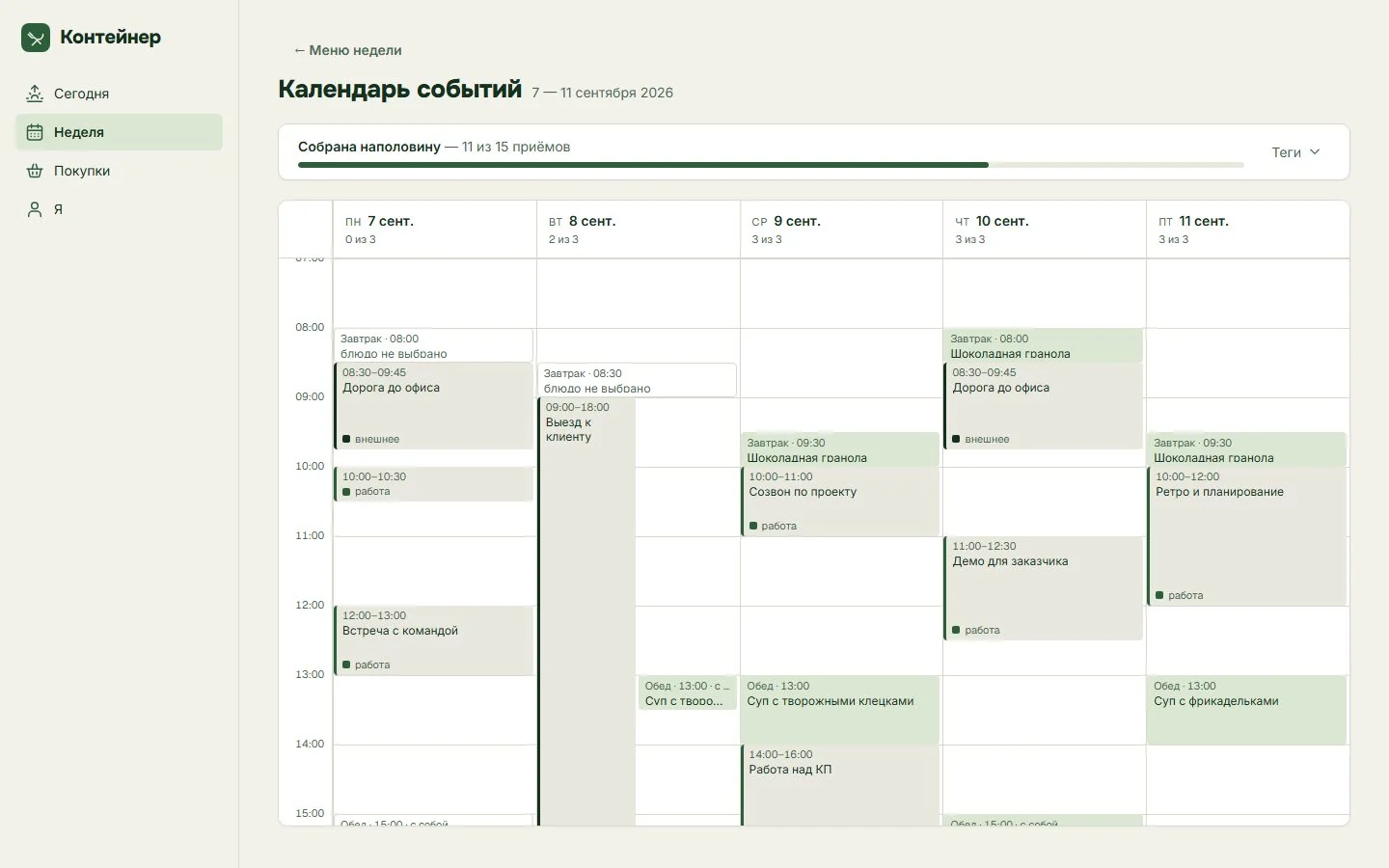
The screenshots show the real app, run locally on a demo week (September 7–11, 2026) because the production copy is password-protected. It's all demo data, so nothing needed masking. The interface is in Russian; the captions translate it.
1. The week goes in as text
The schedule is pasted in as plain text. A parser splits it into days and events with start and end times, and tags each event by keywords: away from home, work or home. A wrong tag can be fixed by hand.
Around the events, the app places three meals a day. Each gets a time window, a place (at home or to go) and a risk level, since days away are exactly where the slips happen.
2. Dishes are picked by photo
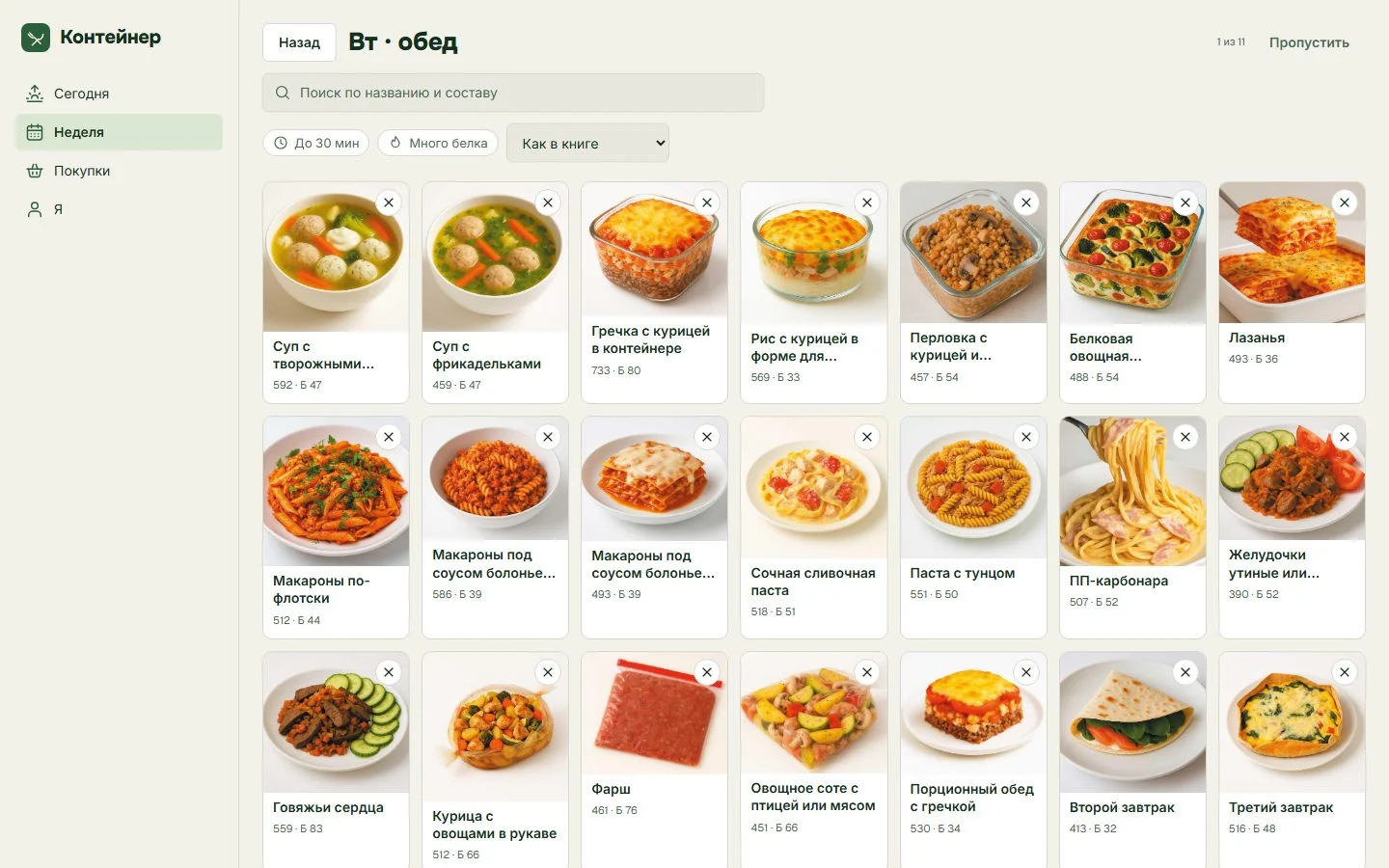
"Build the week" walks through the empty meals one by one. For each, you pick a dish from a photo grid of 123 recipes, with calories and protein on every card, search by name and ingredient, and filters for quick or high-protein dishes.
The app adds up calories, protein, fat and carbs, and you can set a daily target.
3. The whole week on one screen
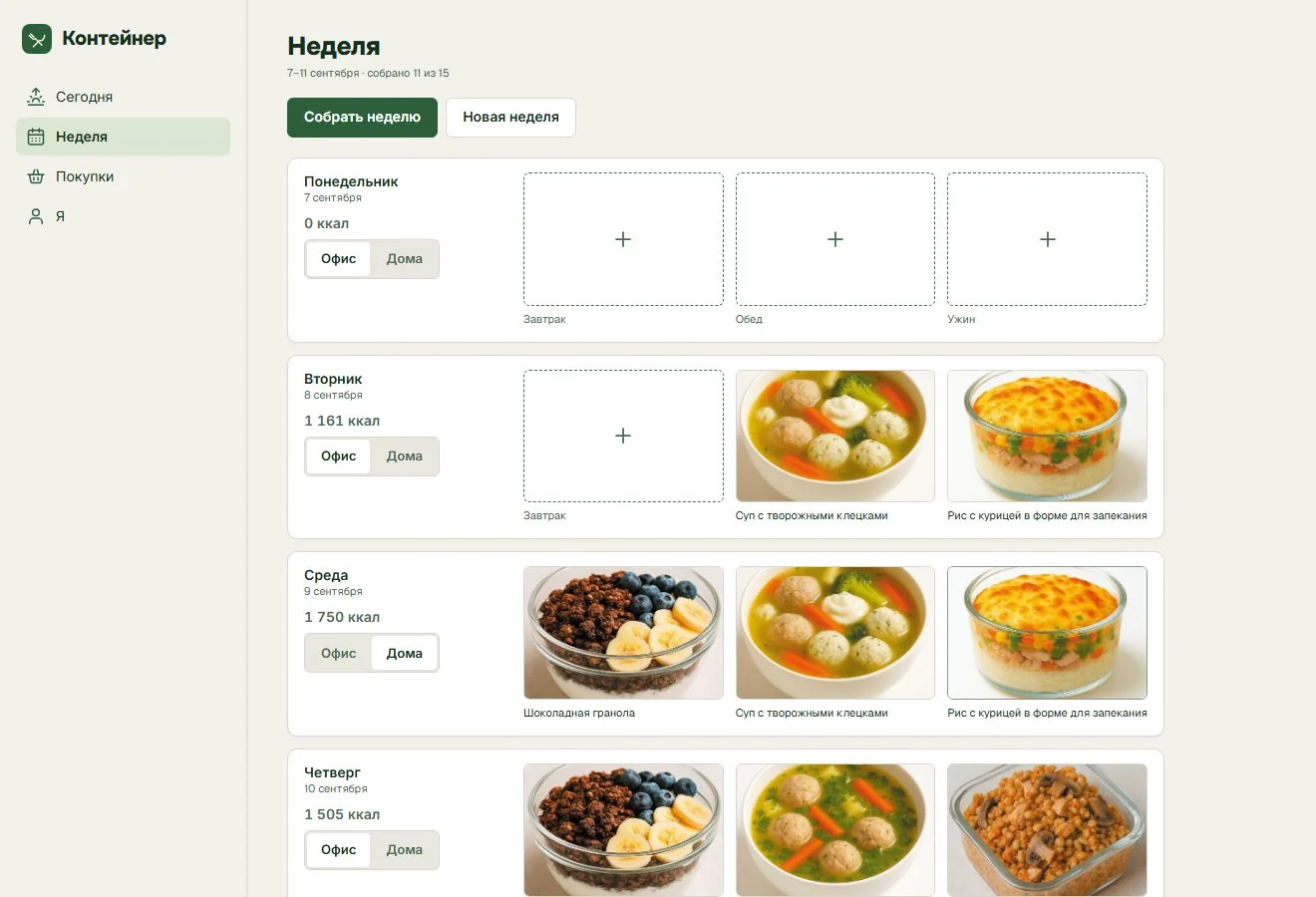
The Week tab shows the whole plan: three plates a day, a calorie total per day and an "Office / Home" switch for each day.
4. A shopping list that turns into a cart
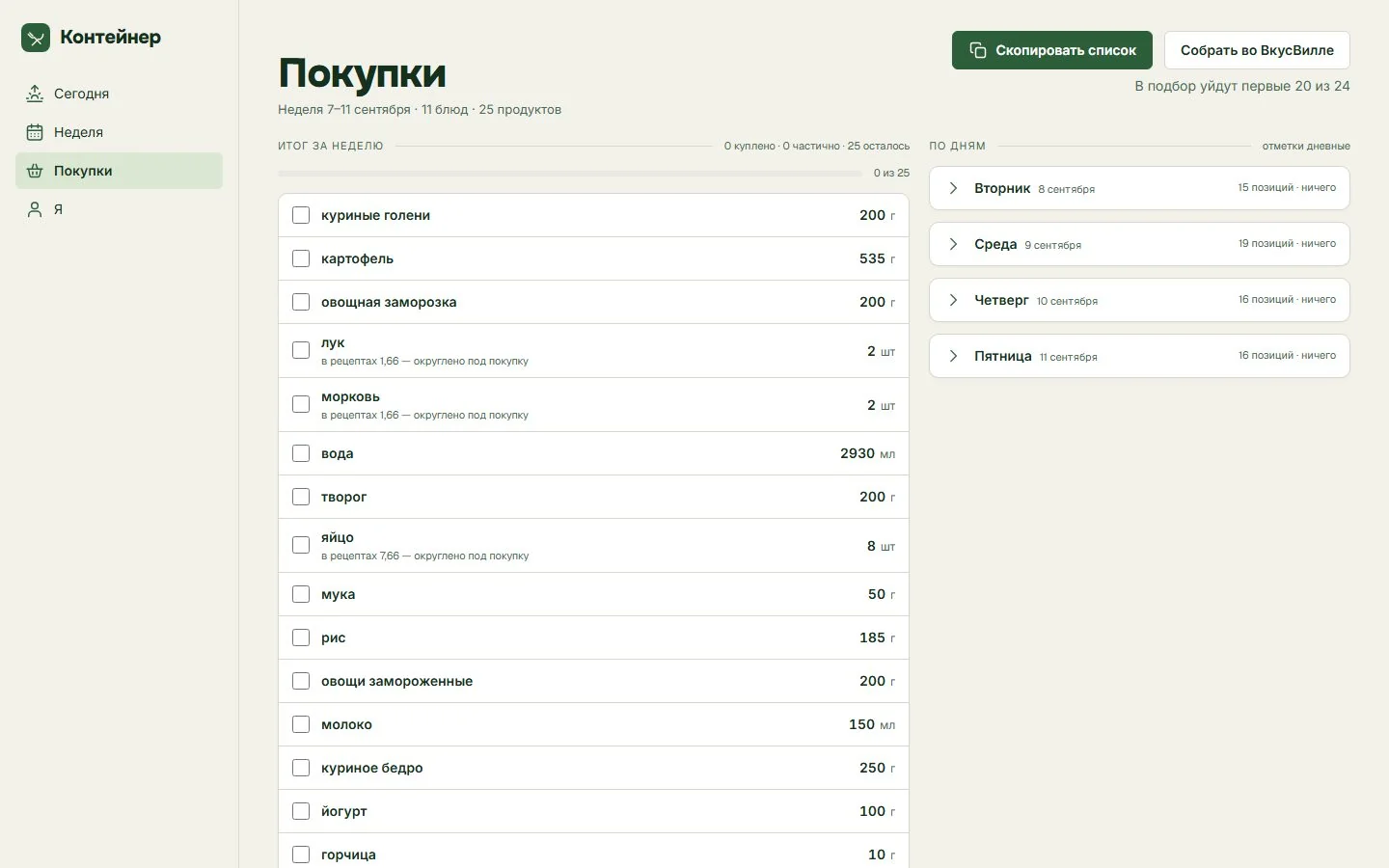
The list is built from the chosen dishes, for the whole week and for each day. Where a recipe needs part of something sold whole, it rounds up: 1.66 onions in the recipes means 2 on the list.
Then you copy it as text — or tap "Build in VkusVill", and the app searches the store itself and fills a cart for you. There's a limit: in the demo week, the first 20 of 24 items go into the selection.
5. Today
During the week, the Today tab leads with the next meal, when and where it happens, and an "Ate it" button. Everything else is folded away.

6. On the phone
Container opens in a phone's browser and installs on the home screen like a regular app, with the four tabs moving to a bottom bar. Offline changes wait in a queue until the app can sync.
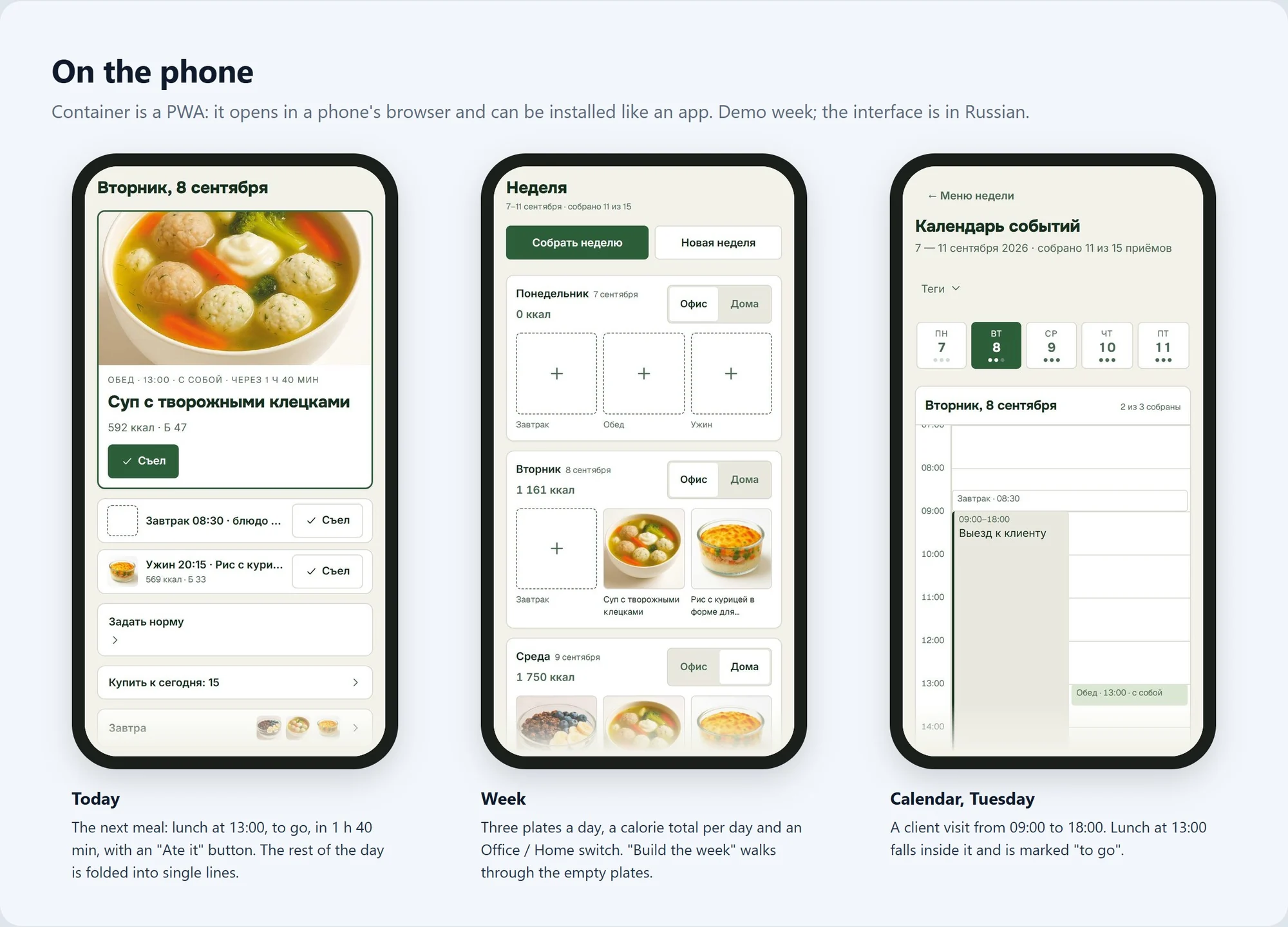
How it's used day to day
Let me be upfront: Container has one user and no analytics. So no claims here about time saved, fewer fast-food meals or health. Just what was built.
It's designed around a weekly routine (this is the workflow, not measured usage):
- Once a week: paste the schedule, check the tags, fill the empty meals, then copy the shopping list or send it to a VkusVill cart. "New week" starts the next one.
- Every day: open Today and tap "Ate it". It also shows how many items to buy for the day and a preview of tomorrow.
- When plans change: edit the schedule or a tag. Only the input is stored, so the meals, totals and shopping list are simply recalculated.
Numbers and cost
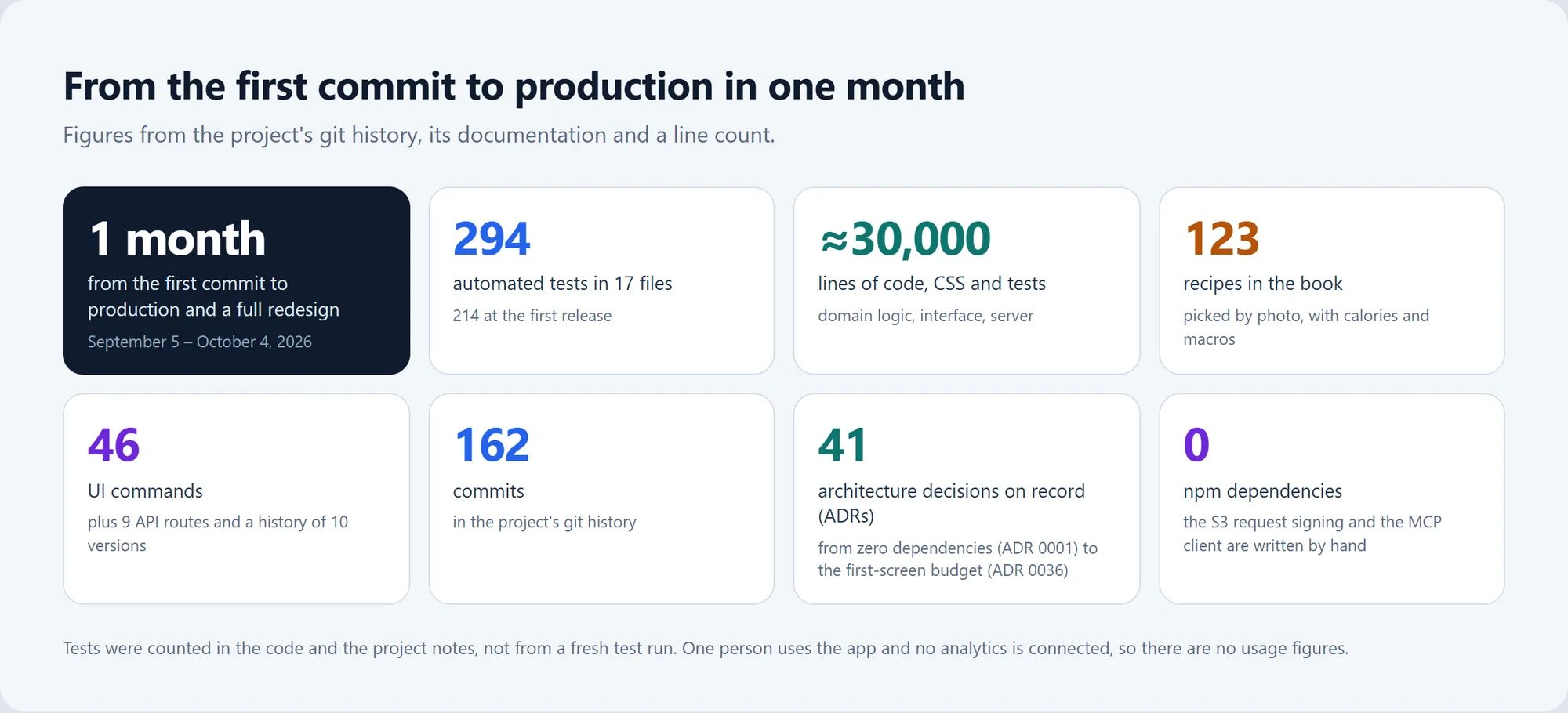
Running it. There's no running-cost figure: the app lives on the customer's private server.
Something similar for you. The price is agreed after a short brief.
How it works
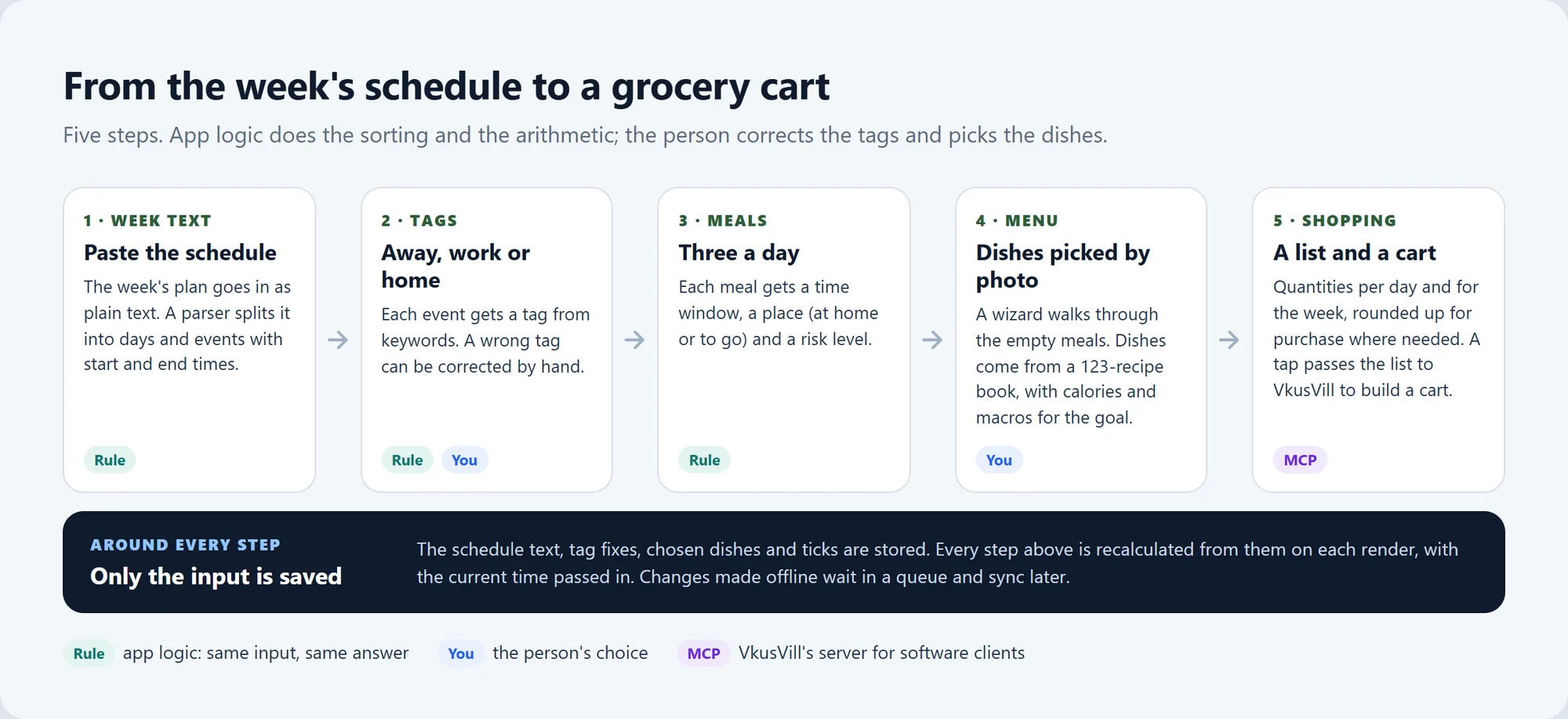
Saved once, recalculated every time

Plenty of apps save their results, like a planned menu or a shopping list. Container stores only the input (the schedule text, tag fixes, chosen dishes and ticks) and recalculates everything else on every render.
That keeps the screens in step: if Tuesday's schedule changes, no stale shopping list is left behind, since the list is always computed from the current week.
By the way, the domain logic doesn't read the clock either: the current time is passed in as a parameter. "Lunch in 1 h 40 min" is calculated from the input and a given moment, so a test can set any moment and check the answer.
That's how the whole domain layer got covered by tests.
Offline changes, one merge rule
Offline changes wait in a queue and reach the server later. Two copies of the same sync rules tend to drift apart, so there's just one: the server imports the client's module, and both sides merge by the same rule.
A budget for the first screen

The first version, a single page, was rebuilt around four tabs. To stop the screens from bloating again, the project got an iron rule — a "first-screen budget": no more than one primary button and three items.
The nice part: an automated test checks the budget without even opening a browser, so a change that breaks it simply fails🔥
On the part of a phone screen that's visible without scrolling:
| Screen | Elements | Characters |
|---|---|---|
| Today | 22 → 9 | 1,819 → 324 |
| Progress → Me | 20 → 6 | 1,632 → 163 |
| Recipes | 63 → 61 | 5,928 → 4,162 |
These are counts of interface elements and text, not a usability study. Today lost more than half its elements and four-fifths of its text. Recipes changed least: two fewer elements and ~30% less text.
Working within VkusVill's limits
The store limits how many requests it accepts, so product searches go out one at a time, not in a burst. A "too many requests" answer stops the queue.
The store client and the storage request signing are both hand-written: the project has zero third-party libraries. One less source of updates and breakage, at the cost of keeping protocol code in-house.
Development: one month
| Date | What happened |
|---|---|
| Sep 5, 2026 | First commit. |
| Sep 5–24 | The first version, a single page. After the "service, not a single page" request, it's redesigned around four tabs. |
| Sep 24 | The redesign is finished: the handoff note for it is dated that day. |
| Oct 4, 2026 | One month after the first commit: the app is in production with the redesign in place. |
Who this is for
- Meal-prep, nutrition and fitness services: plans built around a client's real week, not an ideal one.
- Grocery and delivery businesses: a planner that ends in their own cart.
- Dietitians and coaches whose clients slip on days away.
- Individuals and small teams with their own routine: an app on the phone, their own server, no third-party packages.
Engineering details
Engineering details
Architecture
- Data: a one-way flow. Only the input is stored and the domain layer derives the rest on each render; history keeps 10 versions. Time comes in as a parameter.
- Integrations: a hand-written MCP client for VkusVill (searches one at a time, a stop on
rate_limited) and hand-written SigV4 signing for S3. No npm dependencies (ADR 0001). - Documentation: 41 ADRs, a CLAUDE.md file with the project's rules for the AI agent, a VPS deployment guide and handoff notes.
Quality and tests
- 294 automated tests in 17 files on Node's built-in test runner (node:test); 214 at the first release. The whole domain layer is covered, and the first-screen budget is a test too.
- Caveat: the test figures come from the code and the project notes, not from a fresh test run for this case.
Data and privacy
- One user, and no analytics. The production copy sits on a private VPS behind a password; the screenshots come from a local run on a demo week.
- VkusVill receives product searches when a cart is built from the shopping list.
Tech stack
| Layer | Technology |
|---|---|
| Server | Node 24 (ES modules), 9 API routes, no npm dependencies |
| Front end | Plain JavaScript without a bundler; PWA with a service worker; 46 interface commands |
| Sync | Offline queue; sync module shared with the client |
| Storage | S3 object storage; SigV4 signing written by hand |
| Grocery integration | VkusVill's MCP server through a custom MCP client |
| Tests | node:test |
| Hosting | Ubuntu VPS, Caddy, systemd |
| Built with | Claude Code (an AI coding agent) |
About 30,000 lines of code, CSS and tests across the domain logic, interface and server.