
At a glance
- Built for
- A Telegram marketing agency that runs chat mailings, collects audiences and comments under posts for dozens of clients.
- My role
- I designed and wrote every tool, from the first utility in June 2024 to the latest in July 2026, plus the conventions that make them one kit.
- Task
- Take the manual routine out of the agency's work, from checking chat databases to reporting to clients.
- What I built
- 16 programs: five apps that work on whole batches of Telegram accounts at once, and eleven smaller utilities for databases, AI steps and reports. One account format, one style of input and output files, progress saved as they go.
- Timeline
- June 2024 – July 2026, one tool at a time, as the agency needed them.
- Scale
- Up to 872 accounts in one run. 74,644 chat and channel links through three checks. 286 client reports covering 379,105 successful sends across 102,973 chats.
- Safeguards
- One message per recipient: processed recipients leave the list. An account stops at its first spam warning. Private channels that need a join request are marked, not joined.
- Status
- Working tools with real runs from 2024 to 2026: separate programs, not one app.
Where it started
At this agency, every campaign began with the same chores. I kept taking them over with programs, one at a time — until the grind was gone.
A database of 20,000 chats comes in, bought or parsed, and two thirds of it turns out to be inactive. A list of 33,000 channels has to shrink to the ones with open comments that still post. A batch of 365 accounts needs new bios, almost a thousand need a channel removed from the profile, and after every mailing the client expects a tidy report, not a raw export.
By hand, each of these means days or weeks of opening links one at a time😅
I wrote the tools one at a time, each for one of these jobs. Over two years they lined up into a chain: databases → checks → audience → account prep → outreach → report. All of them run on the same accounts as the agency's other tools, with no conversions.
What the kit does

There's no single app: each tool runs from the console or a simple file-picker window, takes a file in and writes a file out. Here's the chain stage by stage, with charts from real runs.
1. Databases: merge, sort, filter
Raw chat lists, collected in bulk, are a mess: dozens of files, channels mixed with chats, duplicates, chats where nobody can post.
The database builder merges dozens of database files, drops channels, chats where posting is off and chats under 10 members, removes duplicates by ID and saves a clean Excel file. Then one of three sorting profiles kicks in:
- strict, for chat mailings: only chats you can post in, sorted by size and filtered through about 500 stop words in 16 categories (other regions, crypto, betting, adult content, dating, school kids and more);
- soft: only chats in the target language;
- keyword: only chats about the niche, real estate for example.
Checking tens of thousands of titles against 500 stop words by hand isn't realistic. The script does it in seconds.
The AI channel filter has a small AI model read 10 posts from a channel and answer "fit" or "not fit", with a one-sentence reason. Shock content, betting, games for school kids and adult content go; business, marketing, self-development, education, blogs and travel stay. A person needs a minute or two per channel, the model needs seconds and a fraction of a cent.
2. Checks: what's still alive
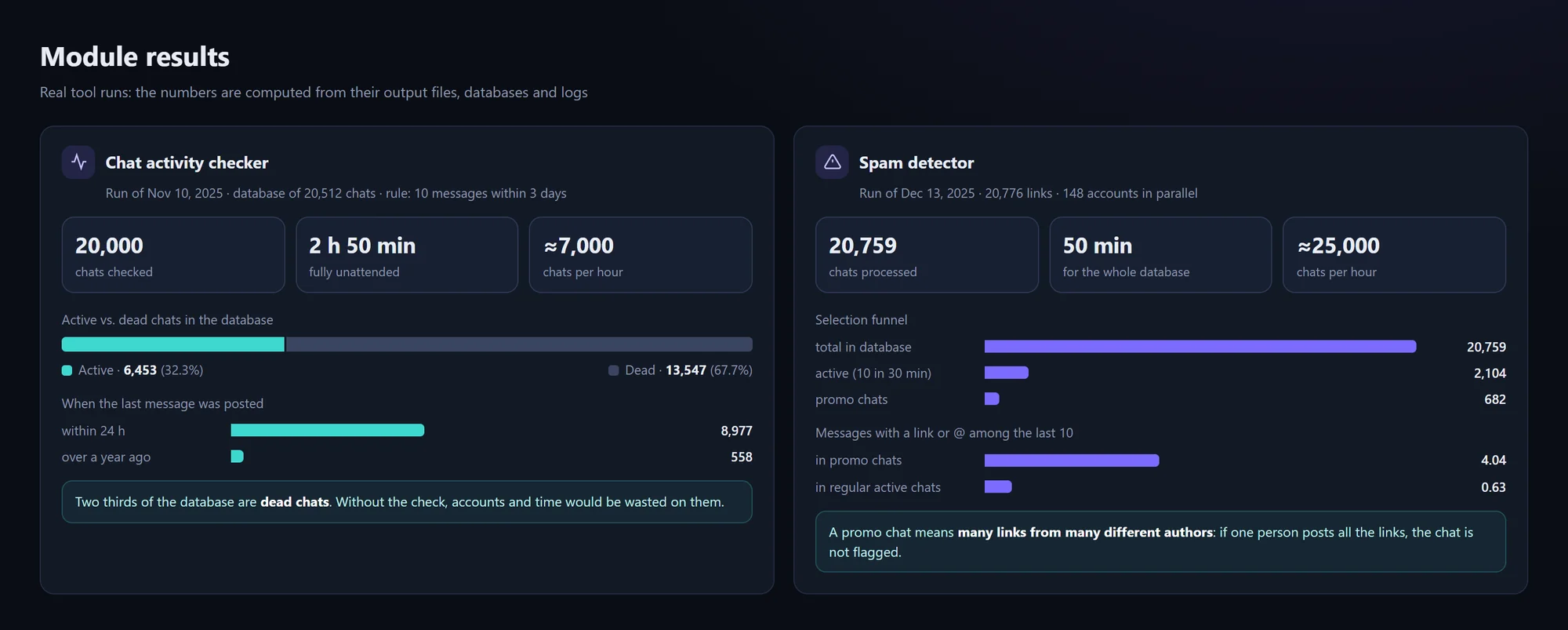
The chat activity checker reads the last 10 messages of each chat and decides: active (at least 10 messages in the last 3 days) or dead.
On November 10, 2025 it took a database of 20,512 chats and checked 20,000 of them in 2 hours 50 minutes, about 7,000 an hour, with nobody watching. 6,453 chats (32.3%) passed, and 13,547 (67.7%) were marked dead: two thirds of the database flagged before a single account was spent on it.
The spam detector, a second version of the same engine, looks for promo chats: very active ones (10 messages in the last 30 minutes) where lots of different people post links and @mentions. The agency can use them as ad venues or drop them before collecting an audience.
On December 13, 2025 it took a database of 20,776 links and processed 20,759 chats in 50 minutes on 148 accounts. 2,104 chats were that active, and 682 of them turned out to be promo chats.
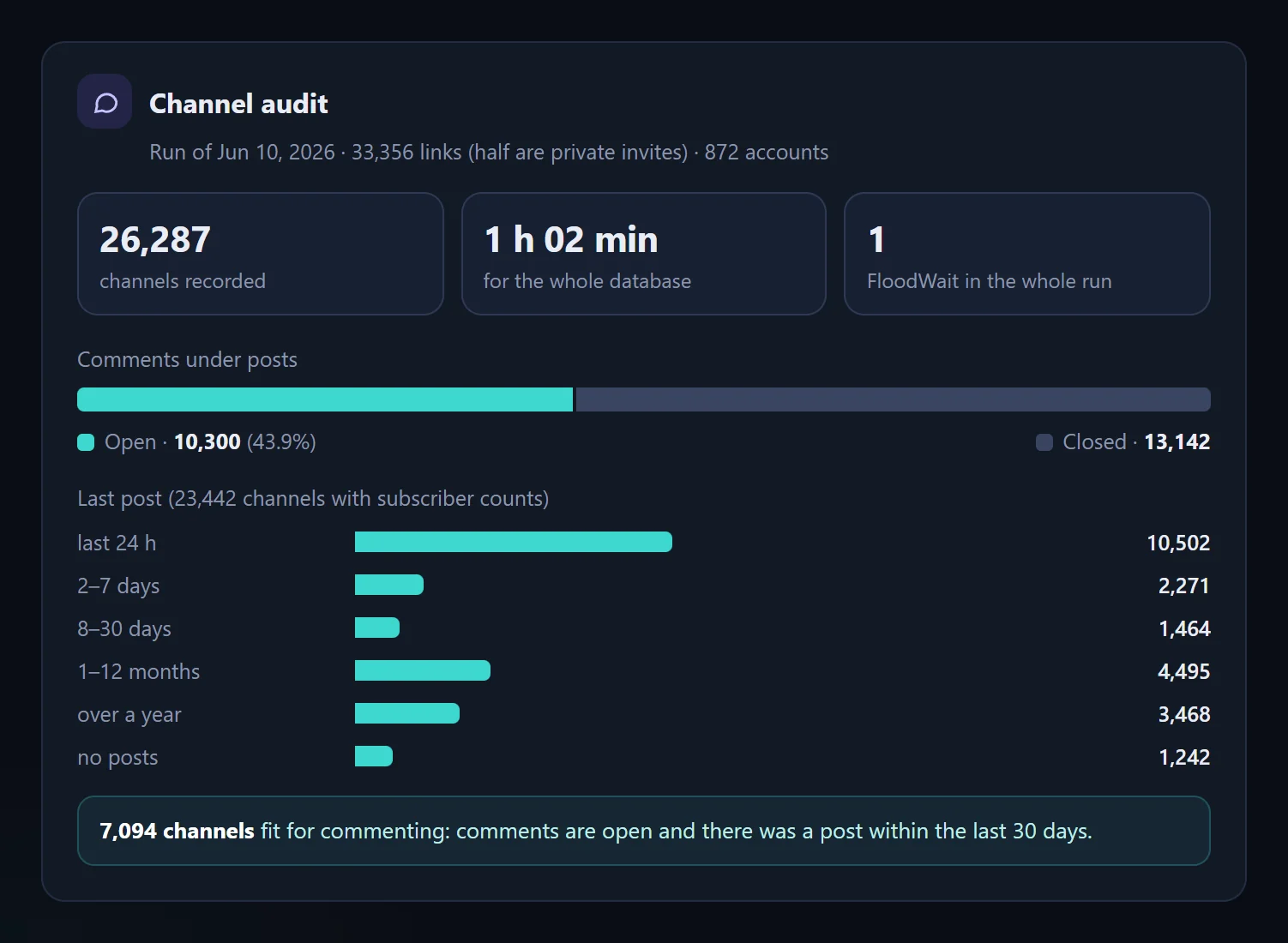
The channel audit records the title, subscriber count, comment settings and date of the last post for each channel link. It reads private channels through invite links without joining when it can, and if a channel only takes join requests, it marks it "request" and doesn't join.
On June 10, 2026 it went through 33,356 links, half of them private invites, with 872 accounts in 1 hour 2 minutes, and recorded 26,287 channels. Of the 23,442 with full data, 10,300 (43.9%) had comments open and 14,237 (60.7%) had posted in the last 30 days. 7,094 channels were fit for commenting: comments open and the channel alive.
3. Audience: clean lists
Audience cleanup merges parsed user lists and keeps only people who were online recently and have a username, with no duplicates. List compare is a tiny window: paste in two lists and see which lines are only in one of them, so you know who's already been processed.
4. Account prep
- Bulk profile update sets bios across a whole batch and sorts the results: set, banned, frozen, other. The logs show 2,006 bios set; the longest run covered 365 accounts.
- Channel unlinking removes the personal channel from every profile in a batch, in parallel: 956 accounts in 32 seconds, against an estimated 24 hours by hand.
- AI avatars generates niche avatars with Stability AI: 100 per run, 8 at a time.
- AI texts writes 1,000 texts from one prompt, in batches of 20, for profile bios and replies.
5. Outreach: one message per person
Let me be upfront: messaging people who didn't ask for it is restricted by Telegram's terms and, in many countries, by privacy and marketing law. So the kit sends one message per person, with no follow-up sequence, and a new deployment starts with a check of what's allowed for the client's market and use.
DM outreach sends a text or a forwarded channel post from a pool of up to 200 accounts, with a full-screen board showing progress. Processed recipients leave the list even if the run is stopped with Ctrl+C, so a rerun never goes back to people already processed.
An account that gets a spam warning stops by itself instead of being pushed until it's blocked. That lowers the risk, but guarantees nothing.
6. Client reports
The report generator merges the agency's mailing statistics, keeps only successful sends, removes internal columns and saves a neat Excel file: send time, chat link, status, message. 286 client reports have gone through it, covering 379,105 successful sends across 102,973 unique chats in mailing records from May 2024 to June 2025. Each report takes one run instead of being assembled by hand.
Day to day
Each tool is a separate program you start when a job needs it. The pattern never changes: pick an input file (Excel or a text file of links), answer a couple of questions if the tool asks any, and get back a tidy Excel file or database with readable columns.
While it runs, the console shows a progress bar with the time left, a status line every five seconds or a full-screen board, and a summary at the end. Results are saved during the run, so an interruption costs little, and a settings mistake is explained in plain words, not as a wall of code.

The numbers

Time saved, estimated. For six measured runs I compared the recorded program time with an estimate of the same work done by hand: 30–40 seconds per chat or channel and 1.5–3 minutes per account. By hand that's about 770 hours, roughly 96 working days. The tools needed under 7 hours🚀 On the three database checks, the recorded run time was 60 to 300 times shorter than the manual estimate.

Running costs weren't tracked separately for this kit. The paid AI steps are small: the channel filter costs a fraction of a cent per channel on GPT-4o-mini, and AI texts and avatars are billed per request by the AI providers. The accounts are the agency's own and are shared with its other tools.
Who this is for
- Telegram marketing agencies that check and sort chat and channel databases before every campaign and report to clients after every mailing.
- Teams that buy or parse databases and want to know what's alive before spending accounts on it.
- Teams with big Excel or SQLite exports to merge, deduplicate and filter, or that want an AI step (classifying channels, generating texts or images) inside a workflow they already run.
Engineering details
Engineering details
How one-off scripts became one kit
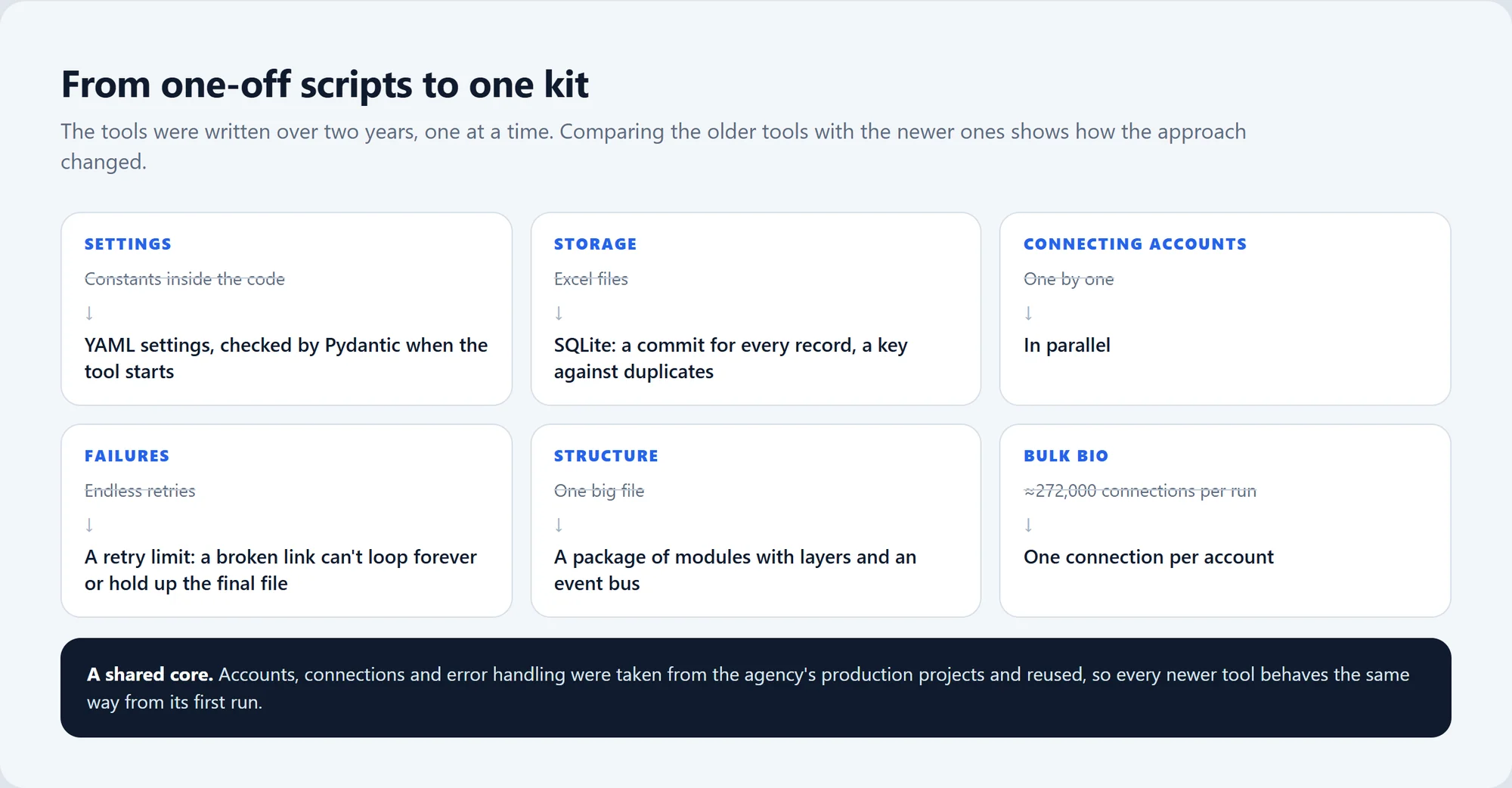
Honestly, nobody designed this as a suite😅 Each tool was written for one problem, and each new one reused whatever had worked in the last. Three things hold them together:
- One account format: a
.sessionand.jsonpair per account. Vendors name the JSON fields differently; the loader understands both layouts and skips a broken pair instead of crashing. - A shared core for accounts, connections and error handling, taken from the agency's production projects, so every newer tool behaves like the rest from its first run.
- The same file conventions: Excel or text in, Excel or SQLite with readable columns out, so one stage's output is the next stage's input.
The newer tools moved settings from constants in the code to YAML checked by Pydantic, storage from Excel to SQLite, and one big file to a package of modules with layers and an event bus; accounts connect in parallel and retries have limits. One fix I'm not proud of: the earlier bulk-bio code reconnected far more often than it needed to, about 272,000 connections in one run. The current version opens one connection per account.
Hundreds of accounts as one pool of workers
The checkers don't give each account a fixed slice of the list. All links sit in one shared queue, and every account is a worker that grabs the next link as soon as it's free, so faster accounts simply do more. The newer tools keep a set number of accounts working at once on a semaphore and rotate through the rest of the pool.
It all runs on asyncio, so hundreds of accounts don't need hundreds of OS threads. When Telegram asks one account to wait, that account pauses and the queue keeps moving. On the largest run, the channel audit of 33,356 links with 872 accounts, Telegram asked for a pause once in the whole hour.
Saved progress and bounded failure
- The older tools save the Excel file every 1,000 rows. The newer ones commit every record to SQLite as soon as it's processed, with a primary key against duplicates and a file of links still to do for the rerun.
- Retries have limits and connections give up quickly on a dead route, so a broken link can't circle the queue forever or hold up the final file.
- Summaries add up: the channel audit wrote 26,287 channels and skipped 7,069, which accounts for all 33,356 links, with no account failing to connect.
Platform answers vs failures
- A request to wait: the account pauses, the queue keeps moving.
- A spam warning: the account stops for the rest of the run.
- A banned or frozen account: its session moves to a separate folder.
- A person who can't be messaged (privacy settings, Premium-only or paid messages, a deleted account): skipped and logged.
- A network error: a connection problem, not the account's fault.
These events go to a database and to a journal for every account, so any run is easy to check afterwards.
Data and privacy
- The tools read what any Telegram account can see: chat and channel titles, member and subscriber counts, comment settings, recent messages with dates. Audience lists use usernames and "last seen" status from parsed user databases.
- Results stay in local Excel and SQLite files. The AI channel filter sends channel posts to the OpenAI API for classification.
- This case shows aggregate numbers only, with no chat, channel or user names in the text or the images.
- A tip for any deployment: session files are as sensitive as passwords, so keep access to them tight. And the check of what's allowed in the client's market comes first.
Tech stack
| Layer | Technology |
|---|---|
| Language and runtime | Python, asyncio |
| Telegram client | Telethon |
| Data | pandas, openpyxl, SQLite |
| Settings | PyYAML, Pydantic v2 |
| Interface | Console progress bars and live boards; Tkinter windows |
| AI | OpenAI API (GPT-4o-mini for the channel filter); Stability AI for avatars |
About 6,400 lines of Python: five multi-account apps (≈5,400 lines) and eleven scripts (≈1,000).